0%
Easier mobile caption usability
How YouTube solved video captions usability issues.

the problem
Prominent Captions is a YouTube video player feature designed to address key mobile captions usability issues:
Enabling captions on mobile was difficult, requiring at least four taps compared to one on desktop.
Viewers could not easily determine if a video even had captions available.
YouTube did not honor device accessibility settings, leading to confusion about setting behaviors.
elevating the captions icon required relocating other icons into the overflow menu without disrupting existing user habits.
Prominent captions make captions highly visible and easily accessible on mobile devices.
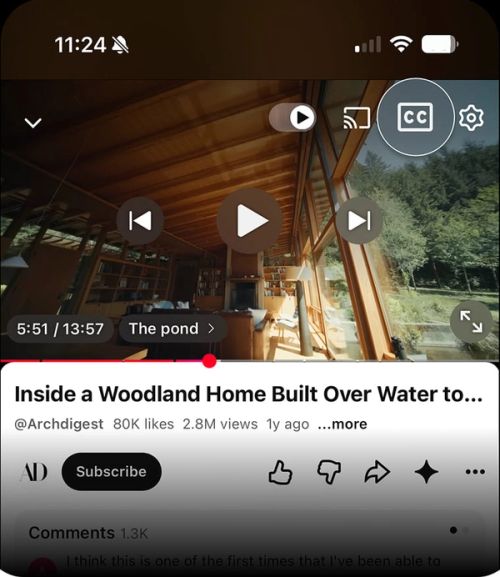
It elevates the captions (CC/subtitles) button out of overflow menus and places it directly at the top-level of the player controls overlay. This bridges the gap between mobile and desktop experiences, providing quick, visible access to subtitles.
how it works
A dedicated captions icon is pinned directly to the top-right corner of the video player overlay.
Surface smart visual states to communicate captions with just one tap.
Long press captions button to select auto-translated languages.


Impact
Streamlined user efficiency with a 17.6-second reduction in time on task.
Improved subtitle accessibility on mobile, mirroring the desktop experience.
featured on
A more accessible YouTube watch experience.
Resolved consistent user confusion regarding whether a video even provided captions or how to trigger them.
